Trucker Guide: Truck Stops
- 4.1
- Rating
- 100.00K
- Installs
- Free
- Price

 Analysis by App-foxy
I found Trucker Guide: Truck GPS Maps most useful as a planning companion for professional drivers who need more context than a normal car-navigation app provides. Its focus is clear: truck-oriented routing, live traffic, truck stops, weigh stations, and routes intended to be safer for larger vehicles. That makes it more relevant to a long-haul driver than a standard map app, although I would still treat its directions as assistance rather than as a replacement for road signs, dispatch instructions, or my own judgment.
The app comes from Trucker Guide and sits in the Maps & Navigation category. It is free to install, suitable for Everyone, and supports devices running Android 8.0 or newer. The current version is 5.0.4, and its presence on more than 100K devices suggests that it has found a real audience among drivers looking for a truck-specific alternative. I also noticed that the app has a 4.1 average from roughly 2.1K ratings, which feels like a useful signal: people generally find value in it, but it is not an experience that will satisfy every driver in every situation.
Why a truck-focused map is different from an ordinary navigation app
My main reason for trying this app was simple. A route that looks perfectly sensible for a car can be awkward, illegal, or unsafe for a truck. Vehicle size, road restrictions, turning space, low clearances, access roads, and the location of suitable stopping areas all matter. A regular navigation app may get me from one address to another, but it often leaves the most important truck-related decisions to me.
You May Also Like

 Blood Strike: 2.5 Anniversary
Blood Strike’s Loadouts Turn Every Drop Into a Tactical Gamble
A close look at Blood Strike’s custom loadouts: how fast access to signature weapons reshapes its battle royale rhythm, rewards preparation, and narrows the gap between fights.

 Pandora - Music & Podcasts
Pandora’s Music Is Easy to Start, but Harder to Recover
Pandora’s strength is its low-effort path from a seed to a station. Its weak spot is how much confidence it asks you to place in connection, setup, and quiet recovery.

 8 Ball Pool
 Is Built on Rivalries, Rematches, and Routine
A close look at the rivalries, rematches, shared routines, and unanswered safety questions that turn a quick pool match into a persistent mobile community.

 Samsung Music
’s Quiet Strength Is Playing What You Already Own
Its reach comes less from spectacle than from dependable access to a personal library. That simplicity is both the app’s strongest retention engine and its ceiling.

 AccuWeather: Weather Radar
AccuWeather Review: A Quick, Clear Forecast for Everyday Decisions
For everyday plans, the best forecast is the one you can understand quickly. AccuWeather makes rain timing, radar, and local conditions easy to act on, with a few trade-offs.

 Hill Climb Racing
Why Hill Climb Racing Still Turns Crashes Into One More Run
A tiny car, a bumpy hill and one more upgrade: Hill Climb Racing keeps resurfacing because its simple chaos makes every near-miss feel personal.
More From Our News Desk



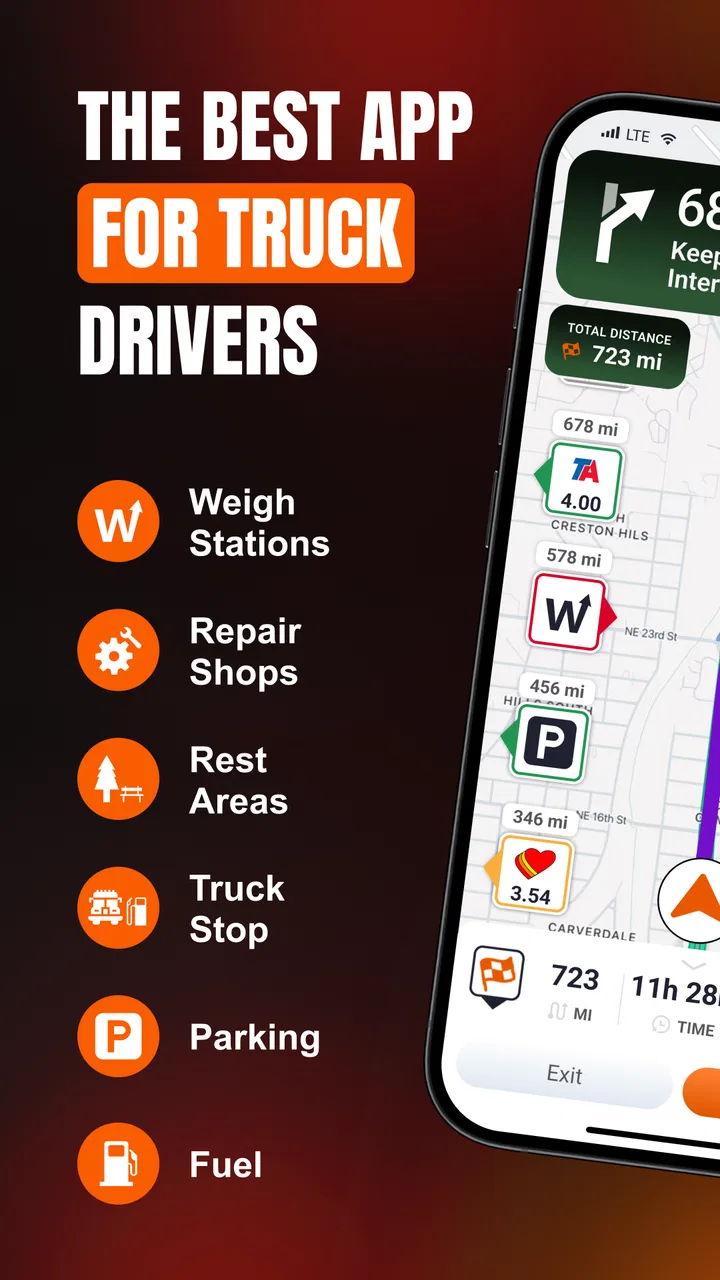
Trucker Guide approaches the problem from a driver's point of view. Instead of treating the destination as the only goal, it puts useful roadside information into the same planning experience. Truck stops and weigh stations are not decorative extras when I am working through a long shift. They can influence where I take a break, where I refuel, and whether I can make a practical stop before reaching a busy delivery area.
The strongest part of the concept is the combination of routing and trip awareness. Live traffic can change the best route, while truck-specific points of interest help me think beyond the next turn. I do not have to use a separate general map simply to locate a truck stop and then return to my navigation screen. Keeping those needs together reduces the amount of switching I have to do while preparing a journey.
I especially like the idea of checking the route before moving rather than waiting for a problem to appear. A driver can review the broad shape of a trip, identify likely stopping areas, and consider whether a traffic-heavy section might affect the schedule. That is a better workflow than blindly following a blue line and discovering too late that the route does not fit the realities of a working truck.
How I would use it before leaving
My preferred routine is to open the app while parked and enter the destination before the engine is running. I look at the suggested route, check where the truck-oriented stops and weigh stations sit along the way, and then compare the timing with the delivery plan. I would not assume that the first suggested stop is automatically the best one. A location may be convenient geographically but poorly timed for a break, or it may sit near a congested area that is better avoided during a busy period.
This pre-trip check is one of the app's less obvious strengths. The value is not only in turn-by-turn guidance. It is in giving me a chance to make decisions while stationary, when I can think clearly and verify the plan against my load, hours, fuel situation, and company instructions. That makes the app more useful as a planning tool than as a device I consult only when I am already uncertain on the road.
A second useful habit is to treat traffic information as a prompt for review, not as an order. If congestion appears ahead, I can consider whether the alternative is appropriate for a commercial vehicle rather than immediately accepting the fastest-looking detour. A car-oriented shortcut may involve narrow streets, awkward turns, or restrictions that are not worth the saved minutes. The app's truck focus gives me a better starting point, but the final decision still belongs to the person behind the wheel.
Where the live information helps most
Live traffic is most valuable when the trip includes major urban approaches, distribution areas, or time-sensitive appointments. In those situations, a delay can affect more than arrival time. It can change where I take a break, whether I reach a suitable parking area, and how much pressure I feel during the final part of the drive.
I would use the traffic layer to identify trouble early and then adjust my expectations. If the road ahead is slowing down, I can avoid planning a stop too tightly, warn a receiver or dispatcher when necessary, and decide whether an alternate route deserves attention. That is more realistic than expecting any navigation app to eliminate delays completely.
There is also a trade-off here. Traffic changes quickly, and no app can guarantee that every incident or slowdown will appear immediately or that every alternative will be better for a truck. I would keep the app running as one source of information, but I would remain alert to roadside signs, radio communication, and conditions that the screen cannot understand.
Truck stops and weigh stations are practical, not merely convenient
The inclusion of truck stops makes a noticeable difference to the way I think about a route. For a private car, a nearby fuel station may be enough. For a truck, the useful question is broader: can I enter comfortably, take the necessary break, and leave without creating a difficult maneuver? A map that highlights truck-relevant locations helps me plan around those realities.
Weigh stations are equally important because they belong to the working rhythm of commercial driving. Seeing them in the route context can help me anticipate where a trip may require extra attention. I would still follow official signs and operating instructions, but having the locations visible during planning is better than being surprised by them.
One practical tip is to avoid planning a stop at the last possible moment. If I wait until fuel, fatigue, or traffic has already become urgent, even a good map has fewer ways to help me. I would use the app to identify several reasonable stopping opportunities early, then choose among them as the journey develops. That creates flexibility without pretending that the route will unfold exactly as expected.
A realistic working-day example
Imagine I am starting a long delivery run early in the morning. Before leaving the yard, I enter the destination and inspect the route. Traffic is already building near a city on the way, so I note the affected section and look at the truck stops beyond it rather than choosing a break based only on distance from the starting point.
As the journey continues, the traffic situation changes. I do not immediately take an unfamiliar side road simply because it appears quicker. Instead, I compare the option with the planned route and consider whether it makes sense for the truck. If the delay is manageable, staying on a known, suitable road may be the better decision. If the delay becomes serious, the app gives me a place to begin evaluating alternatives.
Later, I use the visible stop information to choose a break before reaching the delivery area. That is a small decision, but it can prevent a stressful search at the end of the day. The app has not solved parking, traffic, or scheduling by itself. It has helped me make those decisions earlier, with more information in front of me.
What works well and where I would be cautious
The central strength is focus. Trucker Guide is not trying to be a general-purpose map for everyone. Its identity is built around the needs of truck drivers, and that makes the available information feel more relevant than the usual car-navigation experience. The combination of safe-route thinking, traffic awareness, truck stops, and weigh stations gives me a more complete picture of a working trip.
I also appreciate the free entry point. Someone can try the basic experience without committing money at the start, which is useful for drivers who want to see whether the interface fits their routine. The app does include in-app purchases ranging from $14.99 to $149.99 per item, so I would review any upgrade screen carefully before paying. A free download does not mean every useful option will necessarily remain free, and the wide purchase range makes it especially important to understand what each item provides.
That pricing structure is my clearest point of caution. I do not like making a purchase decision while preparing to drive, and a professional user may need to know exactly which capabilities are included before relying on the app for regular work. I would test the free experience while parked, read the wording around any optional purchase, and decide whether the added value matches how often I drive and how demanding my routes are.
Another limitation is that truck navigation cannot remove the need for common sense. Even a route designed with larger vehicles in mind can meet changing road conditions, temporary restrictions, construction, weather, or a destination entrance that is difficult in practice. I would never let the app override a posted restriction or a clear instruction from a site. The safest use is as a second set of eyes, not as an authority above the road itself.
There is also a difference between planning a route and guaranteeing a successful delivery. The app can help me see traffic and relevant locations, but it cannot know every detail of a receiver's yard, the exact space available at a stop, or the operational priorities set by a dispatcher. That is why I would combine it with the information supplied by the company and the destination.
How it compares with ordinary map apps
A standard map app is usually the better choice for walking directions, public transport, local errands, or a mixed trip where truck-specific information is irrelevant. Those apps often feel familiar to almost everyone, and they can be excellent for finding a business or checking a general address.
For commercial driving, however, the usual alternative can leave too much interpretation to the driver. It may show a quick route without making truck stops and weigh stations central to the planning process. Trucker Guide is more appealing when the trip itself is the main task and the vehicle's needs influence every decision.
I would not use this app as my only navigation tool if I regularly need detailed offline planning, specialized fleet-management integration, or a workflow dictated by a company system unless I had already confirmed that it fits those requirements. Those needs are different from simply finding a truck-aware route. A dedicated professional platform may be a better choice for a fleet with strict dispatch, logging, or operational controls.
For an independent driver, occasional hauler, or someone moving between unfamiliar regions, the balance may be more attractive. The app offers a focused layer of information without requiring me to treat a general map as if it understands every commercial-vehicle concern. That is the situation where I see the strongest case for trying it.
Who should install it, and who should skip it
I would recommend Trucker Guide to drivers who want truck-related points of interest close to their route, regularly deal with traffic, and prefer to prepare a trip before setting off. It should also suit someone who is tired of switching between a normal map, a separate stop finder, and memory when planning a long run.
It is particularly useful for drivers who value flexibility. Rather than selecting one stop and forgetting about it, I can identify several possibilities and adapt as traffic, fatigue, or timing changes. That approach makes the app more valuable than a simple destination-to-destination navigator.
I would be more cautious if I mainly drive short local routes, already have a trusted company navigation system, or need guaranteed compatibility with a specialized professional workflow. In those cases, adding another app may create more screen management than benefit. I would also skip relying on it alone if I am unwilling to verify routes against signs, restrictions, and instructions at the destination.
The Everyone content rating makes it approachable for a broad audience, but the intended use is still clearly professional or truck-oriented. A casual car driver may find the focus unnecessary. The app makes the most sense when the vehicle itself changes what counts as a good route.
My verdict after using it as a planning companion
Trucker Guide succeeds because it addresses a real gap between ordinary navigation and the decisions a truck driver makes throughout a journey. Its useful combination of traffic, truck stops, weigh stations, and truck-conscious routing gives me more than a basic line on a map. The best results come when I use it before departure, identify realistic stopping options, and keep checking the broader plan instead of following directions mechanically.
It is not flawless. I would want to understand the value of the in-app purchases before making the app part of my daily routine, and I would never assume that a suggested route replaces road awareness or company guidance. Those are meaningful limitations, especially for drivers who need a fully integrated professional system.
Still, the free starting point makes trying it reasonable, and the app has enough truck-specific purpose to stand apart from a normal map. My recommendation is strongest for independent and long-distance drivers who want a practical route-planning aid with relevant roadside information. If that describes you, I think it is worth testing while parked and comparing with the tools you already use. Its real advantage is not simply getting me to a destination; it is helping me think through the trip before the next difficult decision arrives.
FAQs for Trucker Guide: Truck Stops
01What features does Trucker Guide: Truck GPS Maps offer to enhance my trucking experience?
Trucker Guide: Truck GPS Maps provides a comprehensive suite of features tailored for truck drivers, including truck-specific routing that considers road restrictions, real-time traffic updates, fuel station locations, and rest stops. It also offers weather forecasts and alerts, ensuring you plan your route with safety and efficiency in mind. Additionally, the app supports offline maps, which is crucial for areas with limited connectivity.
02How accurate and reliable is the GPS navigation in Trucker Guide?
The GPS navigation in Trucker Guide is highly accurate, as it is specifically designed for truck routes. It considers vehicle dimensions, weight limits, and hazardous materials restrictions to provide safe and efficient paths. Regular updates ensure the maps are current, and real-time traffic information aids in avoiding delays. User feedback generally praises the reliability, making it a trusted tool for truckers.
03Is Trucker Guide: Truck GPS Maps available for both Android and iOS devices?
Yes, Trucker Guide: Truck GPS Maps is available for download on both Android and iOS platforms. The app is optimized for mobile use, ensuring a seamless experience across different devices. Users can access the app from the Google Play Store and Apple App Store, making it convenient for truck drivers who use various types of smartphones or tablets.
04Does Trucker Guide include any additional costs or subscription fees?
Trucker Guide: Truck GPS Maps offers a free version with essential features. However, for more advanced options such as premium map updates, enhanced traffic alerts, and priority customer support, a subscription fee may apply. Users are encouraged to explore the basic version first and then decide if the additional features warrant the cost of a premium subscription.
05How easy is it to use Trucker Guide for someone who is not tech-savvy?
Trucker Guide is designed with user-friendliness in mind, making it accessible even for those who are not tech-savvy. The interface is intuitive, with large icons and straightforward navigation. The app includes a tutorial and customer support to assist new users in getting started. Most users find it easy to set up and operate, making it a valuable tool for all levels of tech proficiency.
Pros
- Accurate navigation tailored for trucks.
- Easy-to-use interface with clear maps.
- Customizable routes for different hauls.
- Regular updates with road conditions.
- Offline maps for areas with no signal.
Cons
- Requires significant storage space.
- Limited free features; premium needed.
- Occasional GPS signal loss in cities.
- Some routes miss truck-friendly stops.
- Battery drain on long-haul trips.

Trucker Guide: Truck Stops
Gallery